Resurrecting the homelab
It’s been a while since I used my homelab. I remember that I shut down the VM’s, the ESXi host and the PowerEdge server close to a year ago. I just powered it back on. Before I did that, I already knew that I would surely encounter problems such as expired licenses & certificates, and forgotten passwords. Switched on the power strip, and the PowerEdge started humming. Its LED lights blinking, and the same goes for the little switch.
Logged in to the iDRAC page (https://idrac.deephackmode.io). I got in using ‘root’ as username and the password that I remembered. Phew!
At the iDRAC Dashboard, clicked “Power On System” button, and then the fans started running in full speed! Opened the virtual console and waited for the ESXi host to be ready.
Logged in to the ESXi host (https://esx-1.deephackmode.io). Same username and password as the iDRAC’s worked!
I see the alert banner that the license has expired! Requested and got temporary licenses from an internal process at Broadcom (as I’m an employee).
Assigned the new license in the ESXi host. Exited Maintenance Mode. Powered on vCenter, Router VM and the Ops Manager.
Tried to log in to the VMware vCenter Server Management (https://vc-1.deephackmode.io:5480/) but the root’s password has expired! I’ll deal with that later.
Logged in to the vCenter UI with ‘administrator@vsphere.local’ user and same password as iDRAC’s. It worked!
All licenses in vCenter has expired. Added the new licenses and assigned them!
Powered on the NSX Manager and Edge VM’s. I know that the username is ‘admin’ but I was failing to get in with the usual passwords. Eventually, after some trial and error, I got in with a password I vaguely remembered. The password has expired though! I had to change it via ssh.
Got in to NSX Manager! The Hosts, Nodes, Tunnels and Zones are all up! Yay! Added the new license to NSX.
Back to the VMware vCenter Server Management. I was able to update root’s password in vCenter (Administration->Users and Groups->Users->root->Edit). Now, I can access it again.
Logged in to Ops Manager UI using the ‘admin’ user and usual password. I logged on to the Ops Manager via SSH using a private key saved in PuTTY!
I started the TKGI and Harbor deployments:
bosh -d pivotal-container-service-9db11bf32763a7a53575 start -n

bosh -d harbor-container-registry-bcee679c611753b689a4 start -n
Both failed, at the pre-start stage. Checked the failure on the TKGI deployment:
$ bosh task 3504
Using environment '10.1.1.11' as client 'ops_manager'

Task 3504

Task 3504 | 21:45:19 | Preparing deployment: Preparing deployment (00:00:01)
Task 3504 | 21:45:20 | Preparing deployment: Rendering templates (00:00:03)
Task 3504 | 21:45:23 | Preparing package compilation: Finding packages to compile (00:00:01)
Task 3504 | 21:45:24 | Updating instance pks-db: pks-db/03025397-6bc2-4b80-9bc0-6ca531b843ab (0) (canary)
Task 3504 | 21:45:41 | L installing packages: pks-db/03025397-6bc2-4b80-9bc0-6ca531b843ab (0) (canary)
Task 3504 | 21:45:43 | L configuring jobs: pks-db/03025397-6bc2-4b80-9bc0-6ca531b843ab (0) (canary)
Task 3504 | 21:45:43 | L executing pre-start: pks-db/03025397-6bc2-4b80-9bc0-6ca531b843ab (0) (canary) (00:10:20)
                     L Error: Action Failed get_task: Task 3134eab7-2687-4f43-7821-a71cb85eb743 result: 1 of 4 pre-start scripts failed. Failed Jobs: pxc-mysql. Successful Jobs: bosh-dns, syslog_forwarder, bpm.
Task 3504 | 21:55:44 | Error: Action Failed get_task: Task 3134eab7-2687-4f43-7821-a71cb85eb743 result: 1 of 4 pre-start scripts failed. Failed Jobs: pxc-mysql. Successful Jobs: bosh-dns, syslog_forwarder, bpm.

Task 3504 Started  Sat May 23 21:45:19 UTC 2026
Task 3504 Finished Sat May 23 21:55:44 UTC 2026
Task 3504 Duration 00:10:25
Task 3504 error

Capturing task '3504' output:
  Expected task '3504' to succeed but state is 'error'

Exit code 1
It was failing on pre-start script of pxc-mysql. The pxc-mysql pre-start logs show the following, which indicates that it was failing to connect to bosh-dns service within the VM.
2026-05-23T21:45:43.913146887Z ----- waiting for bosh_dns
[wait] 2026-05-23T21:45:44.044827380Z INFO - using nameserver 169.254.0.2:53
[wait] 2026-05-23T21:45:44.044906776Z INFO - resolving upcheck.bosh-dns.
[wait] 2026-05-23T21:45:44.049257464Z DEBUG - lookup upcheck.bosh-dns. on 192.168.86.34:53: read udp 169.254.0.2:57258->169.254.0.2:53: read: connection refused
Checked the bosh-dns logs and saw these, which indicates that the bosh-dns certs have expired!
[main] 2025-09-01T16:31:13.139756264Z INFO - bosh-dns stopped
[main] 2026-05-23T21:45:44.465678237Z INFO - bosh-dns starting
[main] 2026-05-23T21:45:44.470291402Z ERROR - Unable to configure health checker failed to load keypair: certificate has expired: validity ended at 2026-04-10 01:55:30 UTC but current time is 2026-05-23 21:45:44 UTC
So, it’s the classic error caused by the bosh-dns certificates being expired.
In the Ops Manager Certifcates Page, the expired bosh-dns certificates are shown too:
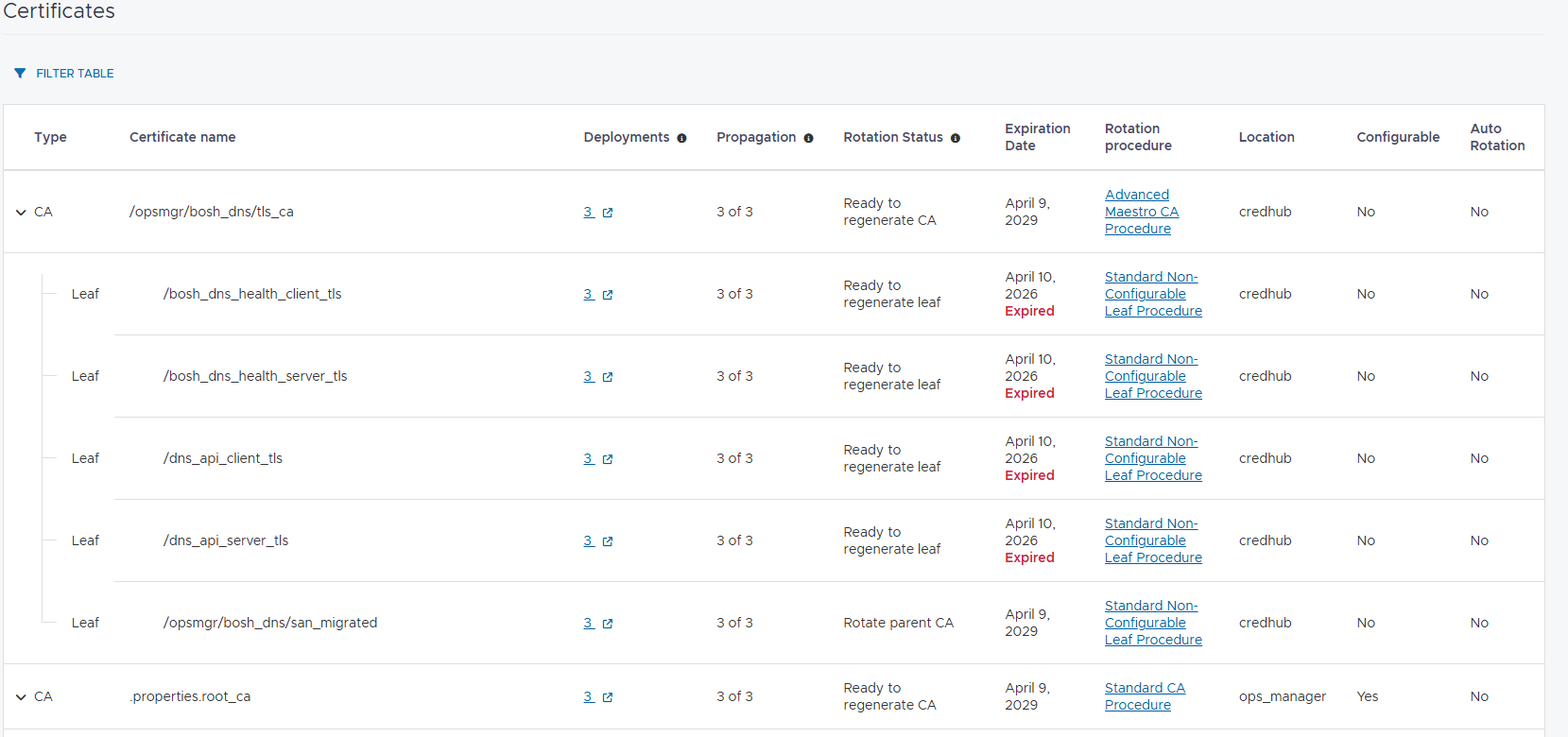
Followed the procedure to rotate the non-configurable leaf certificates.
Had to update the NSX password in the Bosh Tile→Director config settings too. Started the Apply Changes, but it failed in running the upgrade-all-service-instances errand.
Task 3579 | 13:33:59 | Error: Instance(s) 'pivotal-container-service/67599633-9084-46d4-b9dd-4895f5b6a613' is stopped, unable to run errand. Maybe start vm?
To resolve that, I had to ran bosh start on the pks deployment for the second time because the first one failed midway and left the pivotal-container-service instance in a stopped state still.
bosh -d pivotal-container-service-9db11bf32763a7a53575 start -n
Now that the pks deployment instances are up & running, I tried running the upgrade-all-services-instances errand manually, but it failed. I figured that it was because the instances (masters and workers) were still in a stopped state. So, I bosh-started the instances and they got up & running.
At that point, the Harbor deployment was still not updated with the bosh-dns certs because Apply Changes failed in pks deployment earlier. So, I started Apply Changes again, and it completed successfully, and Harbor is now also up & running!
ubuntu@opsmgr:~$ bosh vms
Using environment '10.1.1.11' as client 'ops_manager'

Task 3633
Task 3635
Task 3634
Task 3633 done

Task 3635 done

Task 3634 done

Deployment 'harbor-container-registry-bcee679c611753b689a4'

Instance                                         Process State  AZ   IPs        VM CID                                   VM Type     Active  Stemcell
harbor-app/fbecc999-ce22-44f9-b2dd-4ca531a4ef73  running        az1  10.1.1.14  vm-56a752f9-1d83-4071-89f3-5e4b1b38496c  large.disk  true    bosh-vsphere-esxi-ubuntu-jammy-go_agent/1.785

1 vms

Deployment 'pivotal-container-service-9db11bf32763a7a53575'

Instance                                                        Process State  AZ   IPs        VM CID                                   VM Type     Active  Stemcell
pivotal-container-service/67599633-9084-46d4-b9dd-4895f5b6a613  running        az1  10.1.1.13  vm-c931a2c6-0942-4637-a4ad-7bd68aa435f7  large.disk  true    bosh-vsphere-esxi-ubuntu-jammy-go_agent/1.785
pks-db/03025397-6bc2-4b80-9bc0-6ca531b843ab                     running        az1  10.1.1.12  vm-7e7817d8-b864-4cca-9ef1-fba842f165fe  large.disk  true    bosh-vsphere-esxi-ubuntu-jammy-go_agent/1.785

2 vms

Deployment 'service-instance_6907a1e2-979e-4c6a-bc71-ce688837c178'

Instance                                     Process State  AZ   IPs        VM CID                                   VM Type      Active  Stemcell
master/6f7e6c27-b6b2-424a-845d-06c0654869d2  running        az1  10.16.0.2  vm-cde52dd5-86ef-4c71-9592-0014858dcb72  medium.disk  true    bosh-vsphere-esxi-ubuntu-jammy-go_agent/1.785
worker/a0f0e4a5-114d-422b-9156-12357bf58502  running        az1  10.16.0.3  vm-274299cc-2121-4d08-a470-a1b57b8606b8  medium.disk  true    bosh-vsphere-esxi-ubuntu-jammy-go_agent/1.785

2 vms

Succeeded
ubuntu@opsmgr:~$
Logged in to the TKGI control plane and checked the ‘orion’ cluster:
ubuntu@opsmgr:~$ . env.sh

API Endpoint: tkgi.deephackmode.io
User: admin
Login successful.

ubuntu@opsmgr:~$ tkgi clusters

PKS Version      Name   k8s Version  Plan Name  UUID                                  Status     Action
1.21.0-build.32  orion  1.30.7       small      6907a1e2-979e-4c6a-bc71-ce688837c178  succeeded  UPGRADE

ubuntu@opsmgr:~$ tkgi get-credentials orion

Fetching credentials for cluster orion.
Context set for cluster orion.

You can now switch between clusters by using:
$kubectl config use-context <cluster-name>
ubuntu@opsmgr:~$ kubectl get po -A
NAMESPACE           NAME                                                READY   STATUS      RESTARTS        AGE
kube-system         coredns-85dd57f7df-wkwx7                            1/1     Running     0               19m
kube-system         metrics-server-7f95dbcbdf-hvrpp                     1/1     Running     0               19m
kube-system         snapshot-controller-59ffcb8bc5-hmtfc                1/1     Running     0               19m
kube-system         snapshot-controller-59ffcb8bc5-s577j                1/1     Running     0               19m
kube-system         snapshot-validation-deployment-56fc8658dc-5hvgl     1/1     Running     0               19m
kube-system         snapshot-validation-deployment-56fc8658dc-8f2lw     1/1     Running     0               19m
kube-system         snapshot-validation-deployment-56fc8658dc-9jj5k     1/1     Running     0               19m
nginx               nginx-bf5d5cf98-lksgn                               1/1     Running     0               19m
nginx               nginx-bf5d5cf98-nqfpz                               1/1     Running     0               19m
nginx               nginx-bf5d5cf98-slnd2                               1/1     Running     0               19m
openldap            openldap-fcddc988b-wgwjx                            1/1     Running     0               19m
pks-system          event-controller-fb457457d-bjjjm                    2/2     Running     0               19m
pks-system          fluent-bit-5mrp6                                    2/2     Running     0               17m
pks-system          metric-controller-595c84d4c7-dr4s5                  1/1     Running     0               17m
pks-system          observability-manager-6b8c77c5f-gpmx9               1/1     Running     0               19m
pks-system          sink-controller-7f67fb549c-9gkwm                    1/1     Running     0               17m
pks-system          telegraf-gx2cm                                      1/1     Running     0               18m
pks-system          validator-6bdd686b8-rvthx                           1/1     Running     0               17m
tanzu-system        kapp-controller-598d6646bc-db8mw                    2/2     Running     0               89s
tanzu-system        secretgen-controller-78498c464b-pfms2               1/1     Running     0               19m
vmware-system-csi   vsphere-csi-webhook-678bd7579-6njfz                 1/1     Running     0               19m
vmware-system-csi   vsphere-csi-webhook-678bd7579-qr76t                 1/1     Running     0               19m
vmware-system-csi   vsphere-csi-webhook-678bd7579-xv7mr                 1/1     Running     0               19m
vmware-system-tmc   agent-updater-89d499579-njl5c                       1/1     Running     0               18m
vmware-system-tmc   agentupdater-workload-29660541-52lqx                0/1     Completed   0               21s
vmware-system-tmc   cluster-auth-pinniped-8566f6747d-j4zph              1/1     Running     0               19m
vmware-system-tmc   cluster-auth-pinniped-8566f6747d-lx9m6              1/1     Running     0               19m
vmware-system-tmc   cluster-health-extension-6c6c7f8576-6xwkz           1/1     Running     0               19m
vmware-system-tmc   cluster-secret-69fcf75984-ztzzh                     1/1     Running     0               19m
vmware-system-tmc   extension-manager-688df6b7c4-zcnlb                  1/1     Running     0               18m
vmware-system-tmc   extension-updater-86bf96458c-9vwwm                  1/1     Running     0               18m
vmware-system-tmc   gatekeeper-operator-manager-696cf5f5b7-hwvkm        1/1     Running     0               19m
vmware-system-tmc   inspection-extension-8596b56fbf-9lgb8               1/1     Running     0               19m
vmware-system-tmc   intent-agent-989f4ff75-nnkk7                        0/1     Error       0               19m
vmware-system-tmc   package-deployment-78fb667985-xl9xg                 1/1     Running     0               19m
vmware-system-tmc   policy-insight-extension-manager-858fcd67b8-vs9c9   1/1     Running     6 (3m36s ago)   19m
vmware-system-tmc   policy-sync-extension-5d598d669d-zj7bj              1/1     Running     0               19m
vmware-system-tmc   sync-agent-5bbbcddd55-65fzt                         1/1     Running     0               19m
vmware-system-tmc   tmc-observer-85ddf94675-2q44h                       1/1     Running     0               19m
ubuntu@opsmgr:~$

ubuntu@opsmgr:~$ kubectl get services -A
NAMESPACE           NAME                                                      TYPE           CLUSTER-IP       EXTERNAL-IP      PORT(S)                       AGE
default             kubernetes                                                ClusterIP      10.100.200.1     <none>           443/TCP                       409d
kube-system         kube-dns                                                  ClusterIP      10.100.200.2     <none>           53/UDP,53/TCP,9153/TCP        409d
kube-system         metrics-server                                            ClusterIP      10.100.200.239   <none>           443/TCP                       409d
kube-system         snapshot-validation-service                               ClusterIP      10.100.200.47    <none>           443/TCP                       46m
nginx               nginx                                                     LoadBalancer   10.100.200.254   192.168.16.112   80:31639/TCP                  409d
openldap            openldap-service                                          LoadBalancer   10.100.200.80    192.168.16.114   389:31223/TCP,636:32280/TCP   356d
pks-system          fluent-bit                                                ClusterIP      10.100.200.250   <none>           24224/TCP                     409d
pks-system          validator                                                 ClusterIP      10.100.200.78    <none>           443/TCP                       409d
tanzu-system        packaging-api                                             ClusterIP      10.100.200.216   <none>           443/TCP,8080/TCP              350d
vmware-system-csi   vsphere-webhook-svc                                       ClusterIP      10.100.200.191   <none>           443/TCP                       46m
vmware-system-tmc   cluster-auth-pinniped-api                                 ClusterIP      10.100.200.142   <none>           443/TCP                       350d
vmware-system-tmc   cluster-auth-pinniped-impersonation-proxy-load-balancer   LoadBalancer   10.100.200.143   192.168.16.116   443:31820/TCP                 350d
vmware-system-tmc   cluster-auth-pinniped-proxy                               ClusterIP      10.100.200.178   <none>           443/TCP                       350d
vmware-system-tmc   extension-manager-service                                 ClusterIP      10.100.200.86    <none>           443/TCP                       350d
vmware-system-tmc   extension-updater                                         ClusterIP      10.100.200.233   <none>           9988/TCP                      350d
vmware-system-tmc   gatekeeper-operator-service                               ClusterIP      10.100.200.132   <none>           443/TCP                       350d
vmware-system-tmc   inspection-extension                                      ClusterIP      10.100.200.19    <none>           443/TCP                       350d
vmware-system-tmc   policy-insight-extension-service                          ClusterIP      10.100.200.44    <none>           443/TCP                       350d
vmware-system-tmc   policy-sync-extension                                     ClusterIP      10.100.200.57    <none>           443/TCP                       350d
ubuntu@opsmgr:~$
ubuntu@opsmgr:~$ curl http://192.168.16.112
<!DOCTYPE html>
<html>
<head>
<title>Welcome to nginx!</title>
<style>
html { color-scheme: light dark; }
body { width: 35em; margin: 0 auto;
font-family: Tahoma, Verdana, Arial, sans-serif; }
</style>
</head>
<body>
<h1>Welcome to nginx!</h1>
<p>If you see this page, nginx is successfully installed and working.
Further configuration is required for the web server, reverse proxy,
API gateway, load balancer, content cache, or other features.</p>

<p>For online documentation and support please refer to
<a href="https://nginx.org/">nginx.org</a>.<br/>
To engage with the community please visit
<a href="https://community.nginx.org/">community.nginx.org</a>.<br/>
For enterprise grade support, professional services, additional
security features and capabilities please refer to
<a href="https://f5.com/nginx">f5.com/nginx</a>.</p>

<p><em>Thank you for using nginx.</em></p>
</body>
</html>
ubuntu@opsmgr:~$
Next, powered on all the remaining VM’s that were still off. These include the AVI VM’s, the TKGM Management and Workload clusters’ VM’s, and numbat (my jumpbox).
Logged in to the AVI UI with ‘admin’ and usual password. Added new license to AVI.
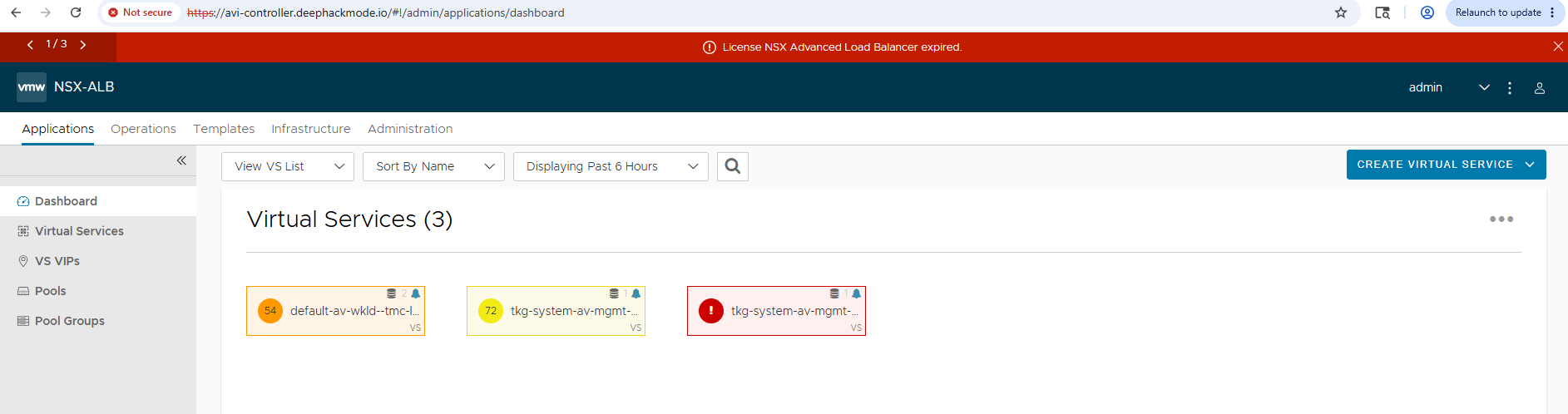
I then quickly check the TKGM clusters. And none of them was running. I didn’t pursue recovery. I will just delete their VMs later.
At that point, I was satisfied with the recovery!
My next plan for the homelab is to install and deploy the Tanzu Elastic Application Runtime (Small Footprint). To be able to do that, I need to free up resources as it’s severely limited in this homelab. I will uninstall everything except for Ops Manager.